
Guide
1099 Reporting Mistakes That Trigger IRS Notices (And How to Avoid Them)
Updated September 29, 2026

Key Takeaways
- Collect a complete Form W-9 before paying eligible contractors, and verify names and TINs carefully.
- Use the correct 1099 form, report accurate amounts, and meet recipient and IRS filing deadlines.
- Respond promptly to CP2100 or CP2100A notices, and follow backup withholding requirements when applicable.
- Maintain organized payment records, correction procedures, and filing confirmations to reduce penalties.
A single incorrect name, taxpayer identification number, payment amount, or filing date can turn routine 1099 reporting into an IRS notice and a costly administrative problem. Small businesses juggle contractors, deadlines, and paperwork all year, so slip-ups happen more often than you'd think. The IRS assesses penalties per information return, so a handful of small errors can snowball fast.
Common trouble spots include missing or incorrect W-9 data, worker misclassification, wrong forms or payment categories, missed deadlines, TIN mismatches, and skipped corrections.
This article walks through each mistake and shows how Tidy Ledgers Bookkeeping keeps contractor records clean and audit-ready.
Mistake 1: Reporting Payments to the Wrong Recipients
One of the most common 1099 mistakes has nothing to do with math. It's about who gets a form. Businesses often mix up payment types, skip vendors who should be reported, or assume a payment doesn't count when it does.

Getting this wrong can trigger IRS notices, penalties, or backup withholding demands[3]. Here's a quick checklist to help sort out common payment categories before you file.
- Payments to independent contractors for services: usually 1099-NEC
- Rent paid to landlords or property owners: usually 1099-MISC
- Prizes, awards, and certain legal settlements: usually 1099-MISC
- Payments made by credit card or through a third-party platform: often excluded and reported differently
- Payments to corporations: often exempt, but attorney fees are a major exception
Classification depends on the facts of each payment. When in doubt, talk to a tax professional before you file.
Not Determining Whether a 1099 Is Required
Before you issue any form, stop and ask a few basic questions. Who did you pay? What was the payment for? How much was it, and does an exception apply[5]?
Payments to independent contractors for services are commonly reported on Form 1099-NEC. Certain rents, prizes, awards, and other miscellaneous payments may instead call for Form 1099-MISC. If you're still unsure who needs a 1099-NEC, that's a good place to start your review.
Rules change, and exceptions apply in specific situations. Always check the current IRS instructions instead of relying on last year's threshold[1].
Overlooking Vendors, Attorneys, and Other Reportable Payees
Many businesses only check accounts labeled "contractors" or "vendors," but reportable payments can also hide in legal, professional service, and honorarium accounts. Payments to corporations are generally exempt from 1099 reporting, but attorney fees are a well-known exception to that exemption[1]. Review every account that could involve an outside payee, not just the ones with "contractor" in the name, so you don't overlook a reportable payment.
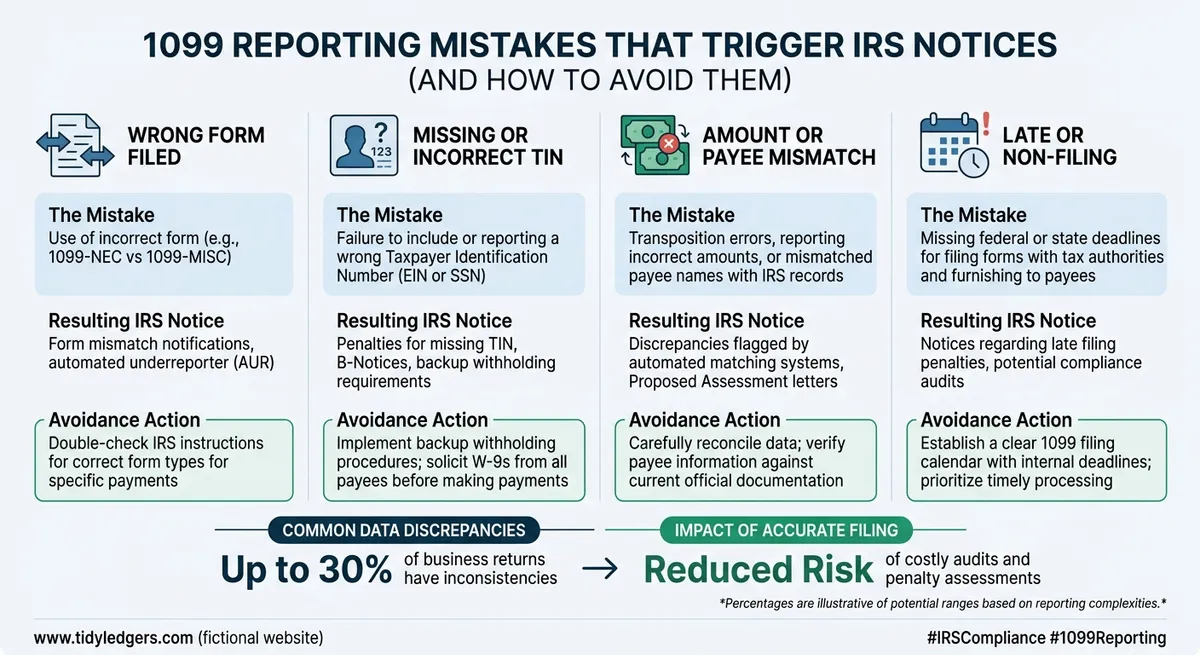
Key data and insights: 1099 Reporting Mistakes That Trigger IRS Notices (And How to Avoid Them)
Mistake 2: Using Incomplete or Incorrect Form W-9 Information
Bad W-9 data is one of the most common reasons 1099s get flagged. It's also one of the easiest problems to prevent. A few smart habits early in the vendor relationship can save you a lot of stress later.
Collecting the W-9 After Payments Begin
Ask for Form W-9 during vendor onboarding. Do this before you send the first payment, not after.
Waiting until year-end creates real problems. Missing forms cause filing delays, raise the odds of name and TIN mismatches, and can trigger backup withholding rules you'd rather avoid[6]. Publication 1099 lays out the payer's duty to request this information up front, and it's worth building into your intake process[4].
Set up a simple follow-up routine for vendors who don't respond. Flag any form that's unsigned, outdated, or missing fields, and don't let it sit. Our W-9 collection tips walk through a step-by-step way to chase down these gaps before filing season hits.
Need help cleaning up your vendor files before filing season? Request 1099 reporting support from Tidy Ledgers and let our team handle the details.
Entering a Business Name, Legal Name, or TIN Incorrectly
The name and TIN on a 1099 need to match the payee's federal tax records. Use the information on the W-9, not what's on an invoice or a business card.
Common slip-ups include listing a DBA instead of the legal tax owner name, transposing digits in a TIN, or mixing up an EIN with someone's SSN. TIN matching tools can catch these errors before you file[9].
Keep every W-9 on file, even old ones. If a vendor asks you to correct their information, document the request and the date it came in.
Mistake 3: Filing the Wrong Form or Reporting the Wrong Amount
Picking the wrong form is one of the easiest ways to trigger an IRS notice. The IRS matches your form type against the payment category, so a mismatch stands out fast[1]. Amount errors cause the same problem. Here's a quick look at common payment types and where they trip people up.

| Payment Situation | Likely Federal Form | Accounting Review Needed | Common Mistake |
|---|---|---|---|
| Contractor services | Form 1099-NEC | Confirm total paid by cash or check | Filed on 1099-MISC instead of 1099-NEC |
| Rent payments | Form 1099-MISC | Check lease terms and payment ledger | Left off the return entirely |
| Attorney fees | Form 1099-MISC or 1099-NEC, depending on the payment type | Separate legal fees from settlement proceeds | Wrong box used on the form |
| Prizes or awards | Form 1099-MISC | Verify fair market value | Reporting only the cash portion |
| Payments possibly reported by a payment settlement entity | May not require a 1099 from you | Check how the payment was processed | Double reporting the same payment |
These are common patterns, not fixed rules for every business. Always check current IRS guidance for your exact situation[4].
Confusing Form 1099-NEC With Form 1099-MISC
Form 1099-NEC covers nonemployee compensation, like payments to freelancers and contractors. Form 1099-MISC covers other things, such as rent, prizes, and certain legal payments. Don't just copy last year's form. Rules and thresholds can shift, and so can your vendor relationships.
Before you file, map each expense account to its correct form and box. This small step avoids a big headache later. It also helps you stay on track with 1099 filing deadlines, since fixing errors after submission takes extra time.
Reporting Gross Payments, Credits, or Reimbursements Incorrectly
The number on your 1099 should match your actual accounting records. Reconcile it against bank statements and payment logs first.
Watch for duplicate payments, voided checks, refunds, and reimbursements. Credit card payments often need special handling too. Don't rely on one expense report alone; check totals by payee and payment method before you file[5].
Failing to Review State and Payment-Method Considerations
Federal filing is only part of the job. Some states have their own 1099 rules and notice requirements[12].
Payments made through third-party processors may follow different reporting rules entirely. Keep documentation and get professional review when you're unsure. Treat your federal form prep and your state and payment-method check as two separate steps, not one.
Mistake 4: Missing 1099 Deadlines or Filing Through the Wrong Channel
Late filing is one of the easiest ways to trigger an IRS notice. Deadlines follow a set pattern each year, but verify the exact dates for the current filing year[4].
- Collect W-9s from every vendor before payments start
- Close out the prior-year ledger
- Reconcile vendor payments against your books
- Prepare draft 1099 forms
- Do a second review for errors
- Send recipient copies
- Submit federal returns
- Confirm the IRS accepted your file
- Archive records for future reference
Missing the Form 1099-NEC Filing Deadline
Form 1099-NEC usually has an earlier IRS deadline than many other information returns[1]. Recipient copies are generally due around the same time. That leaves little room for error.
Set your own internal deadline two weeks before the official due date. This gives you time to fix vendor mistakes or handle transmission problems. If you need help staying ahead of these dates, 1099 reporting support can keep your calendar on track.
Waiting until the last day is risky. Rushed data entry leads to typos. Rejected files often can't be fixed before the deadline passes.
Missing Recipient, IRS, or State Filing Requirements
Furnishing a copy to your recipient is not the same as filing with the IRS. Some states also require their own separate filing[12]. Deadlines can shift depending on the form and filing method, so always check current year instructions.
Keep proof of everything. Save delivery confirmations, transmission logs, acceptance notices, and any extension requests you file.
Ignoring E-Filing Obligations and Filing Rejections
Don't assume paper filing still works for your business. Review current IRS e-filing rules, since thresholds have changed in recent years[4].
Check your transmitter acknowledgment after every submission. Fix rejected files fast. A deadline calendar covering prep, review, submission, and confirmation dates keeps everything on schedule.
Mistake 5: Triggering a CP2100 or CP2100A Notice
A CP2100 or CP2100A notice means the IRS found a name and TIN that don't match. It's not a bill, but it does mean you need to act fast.
Understanding TIN and Name Mismatches
These notices flag information returns where the payee's name and taxpayer ID don't line up with IRS or Social Security Administration records[2]. The mismatch could come from many places. Common culprits include:
- Transposed digits in a Social Security number or EIN
- A legal name that doesn't match what's on file, such as a nickname or misspelling
- An old W-9 that never got updated
- A business that changed ownership or structure without new paperwork
- Simple data-entry errors during filing season
Getting the classification right matters here too. If you're unsure whether someone should get a 1099 in the first place, check the worker classification rules before you chase down TIN corrections. Fixing a mismatch for a worker who shouldn't have received a 1099 just wastes time.
The notice applies to a specific payee and return. Don't try to fix your whole vendor file at once. Match each notice to the exact record it identifies, and work from there.
Using TIN Matching Before Filing
The IRS offers a TIN Matching program for eligible payers and authorized users[9]. It lets you check a name and TIN combination before you file, not after. That's a better place to catch problems.
Run your vendor data through the tool before your filing deadline each year. Keep a record of the results according to your company's document retention policy. This gives you something to point to if a notice shows up later.
A successful TIN match doesn't mean you can skip collecting a properly filled-out W-9. You should still review the payment details behind each return[4]. Guidance on this point is clear:
> IRS guidance emphasizes providing the payee's name and TIN as they appear on the taxpayer's records; use the information from a properly completed Form W-9 and applicable TIN-matching procedures.
Mistake 6: Failing to Correct Errors and Handle Backup Withholding
Finding a mistake is only half the job. What you do next matters just as much.

The IRS expects payers to fix errors fast and respond to notices on time. Ignoring either one can turn a small slip into a costly problem.
Waiting Too Long to Correct an Incorrect 1099
Penalties for late or wrong information returns go up in tiers. The longer you wait, the more it costs[3].
Here's the part that surprises a lot of business owners: these penalties usually apply per form, not per filing[4]. One small error copied across fifty 1099s isn't one mistake. It's fifty.
Keep a correction log for every fix you make. Track the error, when you found it, the corrected form, the recipient notice, the IRS submission, and whether it was accepted.
This log also supports good business records retention habits, since the IRS can ask for proof of your correction efforts later.
Ignoring the First and Second B Notices
A CP2100 or CP2100A notice tells you a payee's name and taxpayer ID don't match IRS records[2]. This isn't a bill. It's a warning you need to act on.
Under the backup withholding B program, you must send the payee a B Notice and ask them to confirm or correct their TIN[6]. Follow the notice's steps closely, since timing rules can change from year to year.
If the same payee triggers a second notice within the required period, the rules change. You may need to start backup withholding on future payments to that person[6].
Applying or Remitting Backup Withholding Incorrectly
When backup withholding starts, it applies at a set statutory rate. It should start and stop on clear, documented dates[6].
Track withheld amounts in a separate account line. Then double-check your deposit schedule, reporting, and communication with the payee.
If a notice seems to conflict with what the payee gave you, don't guess. Get help from a tax professional before deciding whether to start or stop withholding.
| Issue | Immediate Action | Documentation to Request | Withholding Consideration | Escalation Point |
|---|---|---|---|---|
| Incorrect 1099 discovered internally | File corrected form and notify recipient | Updated W-9, proof of correction | Usually none required | Tax preparer if pattern of errors exists |
| CP2100/CP2100A received | Review notice, identify affected payees | Original W-9 on file | Not yet, pending payee response | Compliance staff or accountant |
| First B Notice | Send B Notice to payee, request corrected TIN | Signed W-9 or SSA/IRS confirmation | None if resolved in time allowed | Payroll or AP manager |
| Second B Notice | Send second notice, follow current IRS steps | SSA or IRS verification letter | Likely required on future payments | Tax attorney or CPA |
| Corrected TIN received | Update records, stop withholding if applicable | New signed W-9 | Stop only per current IRS guidance | Accountant to confirm timing |
A Practical System to Prevent 1099 Notices
Most 1099 notices trace back to weak processes, not bad luck. A little structure fixes much of the problem. Here's how to build a system that catches errors before the IRS does.
Build a Vendor Onboarding and W-9 Workflow
Start every vendor relationship with a standard onboarding packet. Ask for the legal name, business structure, taxpayer ID, address, and payment method. Require a completed Form W-9 before you send the first payment[4].
Set up payment holds or approval checkpoints for vendors missing tax paperwork. A monthly exception report can flag gaps early. Make sure any hold fits your contracts and business needs.
Update vendor files whenever something changes. A new owner, legal name, or entity type can affect how you report payments[1]. This upfront work pairs well with the step-by-step filing checklist your team should already be using.
Reconcile Books Before Preparing Information Returns
Before you file anything, run a vendor-by-vendor report from your general ledger. Compare it against accounts payable, bank statements, card records, and payment processor data[5].
Look for duplicate vendor profiles and missing payments. Check for voids, refunds, credits, and payments logged to the wrong expense account. These mismatches can trigger IRS notices[3].
- Have a second person review high-dollar vendors
- Flag unusual payment categories for a closer look
- Compare totals against last year's filings for big swings
A second set of eyes catches what one busy bookkeeper might miss. This step can prevent costly corrections.
Retain Documentation and Assign Ownership
Keep every W-9, payment report, filed form, and delivery record you can. Save IRS acknowledgments, correction records, and notice correspondence too. Good records make it easier to answer an IRS question and fix problems quickly.
Assign clear ownership for each task. One person collects data, another reviews it, and someone signs off on submission. Someone should also own notice response and long-term record retention.
Without clear owners, tasks fall through the cracks every filing season. Many small businesses struggle with this. Tidy Ledgers can help build repeatable reporting and recordkeeping processes that hold up year after year, so your team isn't scrambling every January.
Frequently Asked Questions
What is the most common 1099 mistake that triggers an IRS notice?
Name-and-TIN mismatches are one of the biggest reasons the IRS sends notices about 1099s. This happens when the name on the form doesn't match IRS or Social Security Administration records for that taxpayer ID number. Missing deadlines, using the wrong form type, and reporting incorrect payment amounts can also lead to penalties or extra correspondence. The fix takes discipline: collect a W-9 from every vendor before you pay them, and double-check that name and TIN against your records each year.
How do I fix an incorrect 1099 after it has been filed?
First, pin down exactly what's wrong, whether it's the TIN, the dollar amount, or the recipient's name. Then figure out if you need to file a corrected return with the IRS and send an updated copy to the recipient. Correcting a mistake quickly matters for your wallet, since per-return penalties reportedly increase in tiers the longer an error goes uncorrected, and exact rates and deadlines vary by filing year and return type, so consult current IRS penalty guidance for the figures that apply to you. File the correction through the same channel you used originally, keep proof it was accepted, and if a notice has already shown up, respond by its deadline rather than waiting.
What should I do if my business receives a CP2100 or CP2100A notice?
Match the notice to the specific payee and return you filed. These notices flag a TIN that doesn't match IRS or SSA records. Ask the payee for a corrected W-9 and follow the IRS's B program steps for notifying them in writing.
If you receive a second CP2100 notice for the same payee within the set time frame, you may have to start backup withholding on future payments at the statutory rate. Penalties apply per form, so even a handful of mismatches can add up fast. Get professional help if you're unsure how to proceed.
Conclusion
Most IRS notices come down to a few fixable habits: collect W-9s before you pay anyone, then double-check names and TINs.
Choose the right form, report the right amount, and meet your deadlines. These steps prevent many headaches.
Mistakes still happen, even in careful businesses. When they do, respond fast. A quick correction and clean records can limit the penalty and stress.
Waiting until January to piece together a year of payments almost guarantees errors. A steady, month-by-month bookkeeping process beats a rushed spreadsheet every time.
Now's a good time to review your vendor list and last year's 1099 process. Find what's missing before it becomes a problem. Contact Tidy Ledgers Bookkeeping for help organizing your records, reconciling payments, and getting your 1099 reporting right this year.
Related Articles
- GuideW-9 Collection Tips to Avoid 1099 Filing HeadachesW-9 collection tips to prevent 1099 filing headaches: verify contractor details, secure forms, and avoid IRS notices with a smarter tracking process.Read the guide
- GuideWho Needs A 1099-NEC: Contractor Rules for This YearLearn who needs a 1099-NEC, key payment thresholds, exceptions, and deadlines. Get contractor reporting right-review the rules and prepare before year-end.Read the guide
- Guide1099 Deadlines for Small Businesses: What to File and When1099 deadlines for small businesses made simple: learn 1099-NEC and 1099-MISC due dates, e-filing rules, and tips to avoid penalties. Read now!Read the guide
- GuideBookkeeping for Contractors: Tracking Job Costs, Materials, and Subcontractor PaymentsBookkeeping for contractors made easier: track job costs, materials, subcontractor payments, retainage, and 1099s to protect margins. Learn how today!Read the guide
- GuideEmployee or Independent Contractor? A Simple Classification Guide for Small Business OwnersEmployee or independent contractor? Learn IRS and DOL classification rules, avoid costly misclassification penalties, and protect your small business today.Read the guide
- Financial Reporting & InsightsClear monthly reports, AP/AR, 1099s, and KPIs that turn your numbers into confident decisions
Common questions
What is the most common 1099 mistake that triggers an IRS notice?
Name-and-TIN mismatches are one of the biggest reasons the IRS sends notices about 1099s. This happens when the name on the form doesn't match IRS or Social Security Administration records for that taxpayer ID number. Missing deadlines, using the wrong form type, and reporting incorrect payment amounts can also lead to penalties or extra correspondence. The fix is simple but takes discipline: collect a W-9 from every vendor before you pay them, and double-check that name and TIN against your records each year.”
How do I fix an incorrect 1099 after it has been filed?
First, pin down exactly what's wrong, whether it's the TIN, the dollar amount, or the recipient's name. Then figure out if you need to file a corrected return with the IRS and send an updated copy to the recipient. Correcting a mistake quickly matters a lot for your wallet: fixes made within about 30 days of the deadline get the lowest penalty tier, while corrections made after August 1 (or not made at all) can cost several times more per form. File the correction through the same channel you used originally, keep proof it was accepted, and if a notice has already shown up, respond by its deadline rather than waiting.
What should I do if my business receives a CP2100 or CP2100A notice?
Start by matching the notice to the specific payee and the return you filed, since these notices flag a TIN that doesn't match IRS or SSA records. Send that payee a request for a corrected W-9 and follow the IRS's B program steps for notifying them in writing. If you get a second CP2100 notice for the same payee within the set time frame, you may be required to start backup withholding on their future payments at the statutory rate. Penalties apply per form, so even a handful of mismatches can add up fast, and it's worth getting professional help if you're unsure how to proceed.

Want this handled for you?
Get a free, no-obligation quote and a quick health check of where your books stand. We reply within one business day. No pitch, no pressure.