
Guide
How to Reconcile Accounts Payable and Receivable at Month-End
Updated September 15, 2026

Key Takeaways
- Reconcile AP and AR subledgers to the general ledger every month before finalizing financial statements.
- Use a consistent accounting method and investigate timing differences, duplicates, credits, and unapplied cash.
- Document each reconciliation, assign responsibility for exceptions, and retain supporting invoices, receipts, and reports.
- Automation can reduce repetitive matching work, but review controls and approval procedures remain essential.
A month-end balance can look correct at first glance while hidden duplicates, missing invoices, and unapplied customer payments distort your financial statements. For small and midsized businesses, that gap between "looks fine" and "actually accurate" can lead to bad decisions about cash, credit, and growth.
Reconciliation is the process of matching your AP and AR subsidiary ledgers and supporting records against the general ledger. It sounds basic, but most teams still do it by hand. Research on close processes shows that manual, spreadsheet-heavy work remains the norm rather than the exception [1].
This article walks through a practical month-end workflow: what to check, common exceptions to expect, documentation to keep, and where automation actually helps.
What AP and AR Reconciliation Means at Month-End
Reconciling AP and AR means checking that your subledger totals match your general ledger. It's a core part of any solid month-end bookkeeping checklist. Skip this step, and small errors can snowball into big reporting problems.

Below is a quick comparison of how common transactions show up on each side.
| Area | AP Treatment | AR Treatment | Reconciliation Evidence | Common Exception |
|---|---|---|---|---|
| Unpaid bill/invoice | Unpaid vendor bill sits as a liability | Unpaid customer invoice sits as an asset | Open items report matched to GL balance | Bill or invoice missing from subledger |
| Credit memo | Vendor credit memo reduces amount owed | Customer credit memo reduces amount owed to you | Credit memo list tied to original transaction | Credit applied to wrong invoice or vendor |
| Payment timing | Payment posted in wrong period | Receipt posted in wrong period | Bank statement compared to posting date | Cutoff error shifts balance between months |
Understand the AP and AR Subledgers
Accounts payable is money your business owes to vendors. Accounts receivable is money customers owe you. Every bill, invoice, credit memo, payment, and write-off flows into one of these two subledgers[14].
Each subledger should match its related general ledger control account[13]. If it doesn't, something got missed or entered wrong. That's the whole point of reconciliation: catching those gaps early.
Why Monthly Reconciliation Protects Financial Reporting
Accurate AP and AR balances shape your balance sheet. They also affect working capital, cash forecasting, and how fast you collect revenue. Recent research on month-end close shows that many finance teams still struggle to close books quickly and cleanly[1].
Unresolved exceptions can throw off tax reporting, confuse lenders, and lead management to make decisions based on bad numbers. Catching errors during monthly reconciliation rather than at year-end saves a lot of stress[15].
Choose and Apply the Correct Accounting Method
Accrual accounting records payables and receivables when they're earned or incurred, not when cash moves[7]. Cash accounting tracks money only when it changes hands[6].
Whichever method you pick, stick with it. Consistency affects your period-end cutoff and keeps your numbers comparable month to month[5]. If your situation gets complicated, it's worth checking method-specific rules with a tax professional.
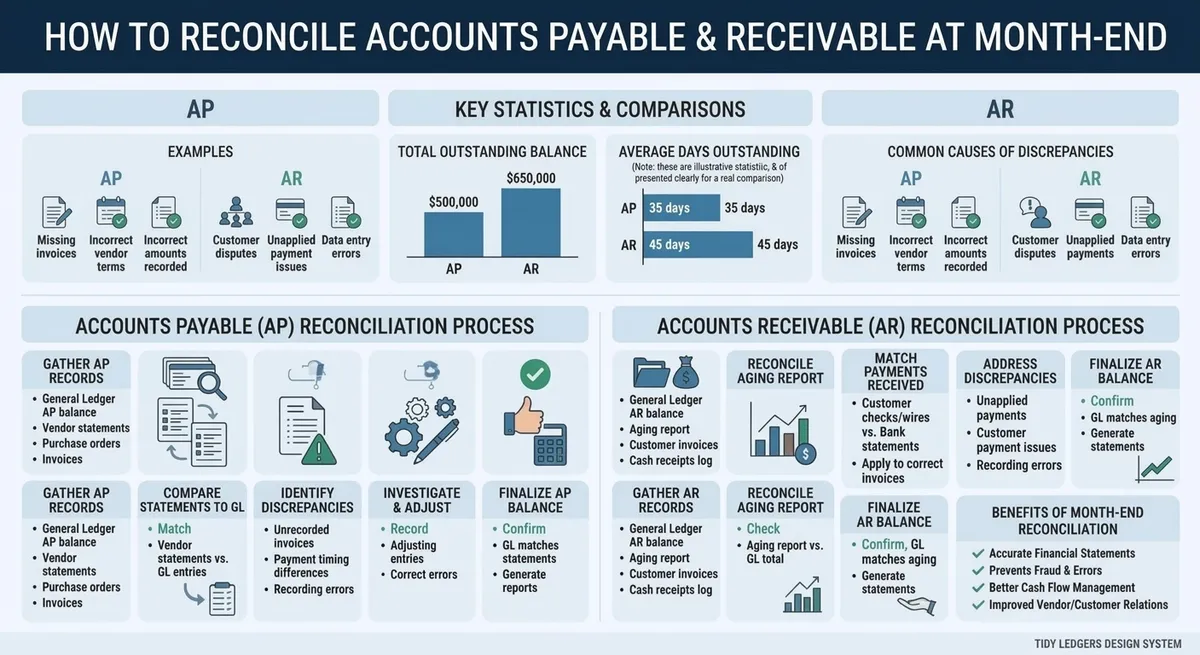
Key data and insights: How to Reconcile Accounts Payable and Receivable at Month-End
Prepare Your Month-End Reconciliation Data
Before you match a single invoice, you need clean data. Good prep work saves hours later and cuts down on errors.
Skipping this step is where most reconciliation problems start[15]. Let's break down what needs to happen first.
Set the Close Date and Cut-Off Rules
Pick a firm month-end date and stick to it. Then decide the exact cut-off: the last invoice, bill, receipt, payment, and credit memo that counts for the period.
Some goods or services arrive before month-end but get invoiced later. You'll need an accrual or a cut-off entry to handle those correctly[7].
Use the same cut-off rules everywhere. AP, AR, cash, purchasing, sales, and payroll should all follow one standard. This keeps your financial reporting and insights consistent across departments.
Gather Reports and Supporting Documentation
Now pull your reports. You'll want the AP aging, AR aging, general-ledger detail, trial balance, and bank activity.
Don't stop there. Add open invoice lists, payment registers, credit memos, and unapplied cash reports to the pile[14].
- Vendor and customer statements
- Purchase orders and receiving records
- Sales documentation and payment confirmations
Write down the report date, accounting period, and who prepared and reviewed each item. Note the system used too. Finance teams that document this well tend to close faster and with fewer surprises[1].
Confirm Opening Balances and Period Activity
Check that this month starts with last month's approved closing numbers. If they don't match, stop and fix it before moving forward.
Compare subledger activity against posted general-ledger entries. Look closely at manual journal entries, since these often hide small errors[13].
Once everything checks out, lock the period or restrict backdated changes. This protects your data and follows good close policy.
How to Reconcile Accounts Payable Step by Step
AP reconciliation follows the same logic as AR, but you're matching bills instead of invoices. Your AP aging report and general ledger control account should match. If they don't, something in the process broke down.[14]

Match the AP Aging to the General Ledger
Start by running the AP aging report as of month-end. Compare its total to the balance in your accounts-payable control account.[15] Don't force these numbers to agree. Instead, trace any gap to specific bills, payments, credits, accruals, or manual journal entries.
Also check that vendor balances sit under the right entity, department, or location. Misclassified balances can throw off reports even when the total dollar figure looks fine. This step matters even more if you outsource monthly bookkeeping services, since your team needs clean data to verify the work.
Review Unpaid Bills, Payments, Credits, and Duplicates
Duplicate invoice numbers are one of the most common AP errors. A bill gets entered twice, or it's posted to the wrong vendor by mistake. Voided payments that stay open on the books also cause problems, along with credit memos that never got applied.
Check payment dates, cleared dates, and check or electronic-payment references. Compare large vendor balances against actual vendor statements. Many finance teams still do this manually, which is part of why only 4% of finance teams report full AP automation [4], and unmatched statements slip through more easily without automated checks.[2] Growing job pressure on AP staff also means fewer hands to catch these errors early.[9]
Record AP Cut-Offs and Adjustments
Look for goods or services you received before month-end that don't have a bill posted yet. These need an accrual. Document every reversal, reclass, and currency adjustment with a clear explanation.[10] Get approval before posting, and keep the paperwork that backs up the amount and the period. IRS guidance on accounting periods can help clarify when an expense belongs in the current month versus the next one.[7]
| AP Symptom | Likely Cause | Verification Step | Corrective Action |
|---|---|---|---|
| AP aging total ($84,200) doesn't match GL control account ($81,750), a $2,450 gap | Duplicate invoice #INV-4471 entered twice | Search AP ledger for repeat invoice numbers and vendor names | Void duplicate, post adjustment JE-1123 |
| Vendor balance disputed during statement review | Unmatched vendor statement, missing credit memo | Compare vendor statement to open bills line by line | Request updated statement, apply credit, note payment date 6/28 |
| Expense missing from month-end books | Unrecorded accrual for goods received, no bill yet | Check receiving reports against posted bills | Post accrual, reverse next month, ref JE-1124 |
| Payment shows paid in bank but open in AP | Timing difference between clear date and post date | Match check number and cleared date to bank statement | Adjust cutoff, confirm no double payment |
How to Reconcile Accounts Receivable Step by Step
AR reconciliation follows the same logic as AP, but you're chasing customer payments instead of vendor bills. The goal is simple: make sure every open invoice has a reason for being open[13]. Work through this checklist for each open item:
- Customer name
- Invoice number
- Invoice date
- Due date
- Payment date
- Amount received
- Unapplied amount
- Credit memo, if any
- Aging bucket (30, 60, 90+ days)
- Resolution owner
Cash application should tie back to remittance detail when a customer provides it. Without that backup, you're guessing which invoice a payment covers, and guesses lead to messy reconciliations later.
Match the AR Aging to the General Ledger
Start by running the AR aging report as of month-end. Compare its total to the accounts-receivable control account in your general ledger[15].
If the numbers don't match, trace the gap to invoices, credit memos, customer deposits, write-offs, refunds, or journal entries. Posting-date errors are a common culprit too. This is also where QuickBooks reconciliation errors tend to surface, especially when invoices get backdated or edited after posting. Confirm balances map to the right legal entity, revenue category, project, or location before moving on.
Apply Cash and Review Customer Balances
Next, match deposits and electronic receipts to remittances, invoices, and bank activity. Unapplied cash can undermine accurate AR, so investigate it right away[3].
Look for unidentified deposits, short pays, overpayments, and payments applied to the wrong customer. Review credit memos, disputed invoices, and collection notes tied to each account. Flag any negative balances or long-outstanding items that don't make sense[8].
Evaluate Bad Debts and AR Cut-Off
Confirm sales and receipts land in the correct period based on your accounting method[7]. Cut-off errors are easy to miss but can shift results between months.
Review each aging bucket for balances needing collection action, allowance estimates, or write-off approval[5]. Separate real timing differences from actual mistakes, and get management sign-off on anything material before you close the books.
Investigate Common AP and AR Reconciliation Differences
Once you spot a variance, don't just plug it and move on. Good reconciliation means finding the real cause[15]. Most differences fall into five buckets: timing, data entry, missing support, application errors, and policy gaps.

Experienced bookkeepers and controllers tend to agree on one thing.
> "The goal isn't to make the numbers match. It's to understand why they didn't match in the first place.". Common guidance among experienced accounting practitioners
Timing and Cut-Off Differences
Timing issues are the most common reason AP and AR don't line up at month-end. An invoice might get recorded in one period, while the payment or receipt lands in the next[7]. The same goes for deposits, credit memos, and vendor bills that arrive late.
To sort this out, check transaction dates against posting dates. Compare service dates, shipping records, and receiving logs, too. Bank clearing dates often reveal which period a transaction really belongs to.
- Invoice dated in one month, paid in the next
- Goods shipped before month-end but invoiced after
- Deposits recorded a day or two after the actual receipt
Document these as temporary differences. Set a reminder to check that they reverse the following month.
Duplicate, Missing, Misapplied, and Unposted Transactions
Next, hunt for duplicates. Look for repeated invoice numbers, near-identical amounts, or the same vendor entered twice under slightly different names[14]. These errors are common when AP automation tools and manual entry both feed the same ledger[2].
Also check for missing bills, receipts posted to the wrong account, and cash sitting in a clearing account with no home. On the AR side, misapplied customer payments cause a lot of confusion[3]. Fix the source transaction instead of forcing a journal entry to balance things out.
Old Uncleared Items and Unusual Balances
Stale checks and old deposits deserve extra attention. So do negative vendor balances, unused customer credits, and invoices that have sat open for months. These old uncleared transactions can quietly distort your books if left alone too long.
Before writing anything off, reach out to the vendor or customer. Get documentation and follow your company's approval policy. Rushed write-offs create new problems down the road, especially with job pressures already high on many finance teams[9].
Keep an exception log for every open item. Track the amount, age, likely cause, owner, and next step[13]. Add an expected resolution date so nothing falls through the cracks.
Document, Review, and Improve the Month-End Process
Good reconciliations don't just happen. They get written down, checked twice, and filed somewhere you can find them later.
Whether you use spreadsheets, accounting software, full automation, or an outside bookkeeper, the same rules apply. You need paper trails, clear ownership, and a way to catch mistakes before they pile up. Research on close practices shows that teams with defined workflows close faster and with fewer surprises[1].
Create a Reconciliation Workpaper
Every reconciliation needs a workpaper. It should show the period-end date, who prepared it, and who reviewed it.
Add the source reports, subledger totals, GL totals, and the variance between them. Explain any differences and list the adjustments made to fix them.
Finish with a sign-off line. This matches standard reconciliation guidance used across accounting teams[15].
- Link each adjustment to the invoice, statement, or journal entry that backs it up
- Use the same folder structure and file names every month
- Store workpapers where they're easy to pull for audits or reading a balance sheet during management review
Use Review Controls and Segregation of Duties
Try to separate the people who prepare entries from those who approve them. Someone else should authorize payments and apply cash.
Require a second review for big variances, write-offs, vendor changes, and customer refunds. Manual journal entries need a second set of eyes too.
Set a dollar threshold for what counts as material. Anything above it should trigger a review before it moves forward.
Decide When Automation or Bookkeeping Support Makes Sense
Automated tools can capture invoices, route approvals, match payments, and apply cash faster than manual entry. Many can also flag duplicate charges and build exception dashboards on their own.
But automation has limits. Reports show most AP teams still haven't reached full automation, and tools don't replace judgment calls on accounting policy or unusual transactions[4]. Staff still need to investigate anything that looks off, and reviews still need to happen[9].
Before you buy a tool or hire outside help, look at your transaction volume, error rates, and how well systems talk to each other. Weigh the cost against your team's current capacity[10]. Automation works best when the source data is clean and approval controls are solid[11].
A Practical AP and AR Month-End Checklist
Use this checklist as a copy-paste starting point for your close process. It follows the same steps used in standard account reconciliation methods, but built for both AP and AR together.
Before Reconciliation
Start by confirming your close calendar, cut-off date, and accounting method. Check that both preparer and reviewer have system access before work begins[7].
- ☐ Close calendar and cut-off date confirmed
- ☐ Accounting method verified (cash or accrual)
- ☐ All bills, invoices, receipts, payments, deposits, and credit memos posted
- ☐ AP aging, AR aging, general ledger detail, trial balance, and bank activity saved
Many teams still handle this manually, which slows things down. If your close still relies on spreadsheets, it may be worth reviewing an AP automation playbook for ideas on cutting prep time.
During Reconciliation
Tie your AP aging report to the AP control account, and your AR aging report to the AR control account[14][13]. Look for duplicates, missing entries, misapplied cash, and stale or disputed items.
- ☐ AP tied to general ledger
- ☐ AR tied to general ledger
- ☐ Exceptions logged with notes
- ☐ Adjustments approved before posting
After Review and Sign-Off
Get reviewer sign-off, then archive the workpaper and update your close checklist. Report material AP obligations and overdue receivables to management right away.
- ☐ Reviewer sign-off completed
- ☐ Follow-up owners assigned
- ☐ Recurring issues logged for process improvement
Only a small share of finance teams report full AP automation today[4], and close timelines remain a common pain point across finance teams[1]. A repeatable checklist like this one won't fix everything, but it keeps errors from piling up month after month.
Frequently Asked Questions
How often should accounts payable and accounts receivable be reconciled?
Monthly reconciliation is the standard minimum, and it should happen before you finalize financial statements. Most accounting best-practice guidance backs this up, recommending that AP and AR subledgers be checked against the general ledger at least once a month to catch discrepancies early. If your business handles a high volume of invoices or payments, though, waiting a full month is risky. Weekly reviews or ongoing exception checks catch problems while they're still small and easy to fix.
What should I do if the AP or AR aging does not match the general ledger?
Start simple: check that both reports use the same date range and filters. A mismatch here causes more false alarms than actual errors. If the dates line up and the numbers still don't match, trace the gap to common culprits such as timing differences, duplicate entries, missing transactions, credit memos, or unapplied cash sitting on the wrong account.
Manual journal entries and mapping errors are also frequent troublemakers. Once you find the real cause, post a correction with supporting documentation instead of forcing the numbers to match.
Can accounting software automatically reconcile AP and AR?
Software handles a lot of the grunt work now: matching invoices to payments, flagging duplicates, routing approvals, and alerting you to exceptions. That said, full automation is still rare. Only about 4% of AP processes are fully automated, according to industry data, which means most teams still rely on manual steps somewhere in the process. Cut-off timing, unusual balances, write-offs, and judgment calls still need a person to review them before you sign off on the numbers.
Conclusion
Your month-end close is only as strong as your reconciliations. When AP and AR subledgers match the general ledger and your supporting documents, you can trust your numbers. Most mismatches come down to a short list of usual suspects: cut-off errors, duplicate entries, missing invoices, unapplied credits, cash application mistakes, and old items nobody cleared out.
Checking these areas every month and writing down what you find turns reconciliation from a guessing game into a routine task. Add clear workpapers, a review step, and the right automation, and you'll close faster with fewer surprises.
Ready to tighten up your process? Use Tidy Ledgers Bookkeeping's month-end checklist to standardize your close. If reconciliations still eat up too much of your time, reach out to Tidy Ledgers Bookkeeping about monthly bookkeeping or financial reporting support. A clean close shouldn't feel like a monthly fire drill.
Related Articles
- GuideMonth-End Bookkeeping Checklist for Small BusinessesA practical monthly routine for reconciling accounts, reviewing financial reports, documenting open items, and closing cleaner books.Read the guide
- GuideHow to Clean Up Old Uncleared Transactions in QuickBooks OnlineAn uncleared transaction is a reconciliation status, not proof that an entry is wrong. This guide helps owners investigate stale QuickBooks Online items, choose a supported next step, and protect reconciled or filed periods.Read the guide
- Guide10 Common QuickBooks Online Errors and How to Fix ThemKey Takeaways Most QuickBooks Online errors involve bank feeds, duplicate transactions, payroll connections, user access, or reconciliation discrepancies....Read the guide
- GuideBehind on your books? A catch-up bookkeeping checklistA calm, step-by-step checklist for business owners who are behind on their books, covering statements, reconciliation, categories, sales tax, payroll, and getting tax-ready.Read the guide
- Monthly BookkeepingCategorized transactions, reconciled accounts, and clean monthly financials, closed on time, every month
- Financial Reporting & InsightsClear monthly reports, AP/AR, 1099s, and KPIs that turn your numbers into confident decisions
Common questions
How often should accounts payable and accounts receivable be reconciled?
Monthly reconciliation is the standard minimum, and it should happen before you finalize financial statements. Most accounting best-practice guidance backs this up, recommending that AP and AR subledgers get checked against the general ledger at least once a month to catch discrepancies early. If your business handles a high volume of invoices or payments, though, waiting a full month is risky. Weekly reviews or ongoing exception checks catch problems while they're still small and easy to fix.
What should I do if the AP or AR aging does not match the general ledger?
Start simple: check that both reports use the same date range and filters. A mismatch here causes more false alarms than actual errors. If the dates line up and the numbers still don't match, trace the gap to common culprits like timing differences, duplicate entries, missing transactions, credit memos, or unapplied cash sitting on the wrong account. Manual journal entries and mapping errors are also frequent troublemakers. Once you find the real cause, post a correction with documentation to back it up, don't just force the numbers to match.
Can accounting software automatically reconcile AP and AR?
Software handles a lot of the grunt work now: matching invoices to payments, flagging duplicates, routing approvals, and alerting you to exceptions. That said, full automation is still rare. Only about 4% of AP processes are fully automated, according to industry data, which means most teams still rely on manual steps somewhere in the process. Cut-off timing, unusual balances, write-offs, and judgment calls still need a person to review them before you sign off on the numbers.

Want this handled for you?
Get a free, no-obligation quote and a quick health check of where your books stand. We reply within one business day. No pitch, no pressure.