
Guide
What Documents Do You Need to Gather Before Your First Bookkeeper Meeting?
Updated October 20, 2026

Key Takeaways
- Start with bank statements, credit card statements, and existing financial reports.
- Bring payroll, contractor, inventory, and loan records only when applicable.
- Confirm the bookkeeping period before gathering years of historical documents.
- Use secure uploads and authorized account access instead of sharing passwords.
Your first bookkeeper meeting should clarify your finances, not send you digging through months of receipts. Whether you're hiring someone new, switching providers, or catching up on unfinished books, a little prep goes a long way.
Here's a good thing to know up front: an intro consultation often needs only a business overview. Detailed document collection usually comes later, after you've agreed on scope and picked a secure way to share files.
This guide gives you a prioritized checklist. You'll see which core documents almost everyone needs, and which records matter only for certain businesses.
Confirm What Your First Bookkeeper Meeting Will Cover
Before you dig through file cabinets, find out what kind of meeting you're walking into. A first conversation with a bookkeeper can mean very different things. Some are quick intro calls. Others are working sessions where you hand over real records.
Asking one simple question up front can save you hours of prep. Ask what the meeting is for and what the bookkeeper wants to see. Then gather only what's needed.
Ask Which Records Are Needed Now Versus Later
A discovery call is usually a chat about your goals, your software, and your pain points. A working onboarding meeting goes deeper. You shouldn't assume every sensitive document is due before you've agreed to work together.
Here's what to confirm ahead of time:
- The accounting period: Which months or years will the bookkeeper review?
- The entities involved: Is it one business, or several?
- The type of work: Is this ongoing bookkeeping, a cleanup, or both?
- The timing: Which records are needed at the meeting, and which can wait?
Gather your most recent complete statements as a starting point. But don't assume you need twelve months of everything. The right period depends on your situation, so ask first. The bookkeeping onboarding process is a good way to see how these steps typically fit together.
Prepare a Business Snapshot and Existing Bookkeeping Files
Next, pull together a quick profile of your business. The SBA's guidance on managing your finances emphasizes proper bookkeeping and basic financial knowledge. A one-page snapshot is an easy way to start.
Include these basics:
- Your business's legal name and entity type
- Your accounting software and fiscal year
- Primary contacts for finance questions
- A list of your business bank and credit accounts
Locate your EIN confirmation letter or formation documents in case they're requested for setup. That said, an introductory meeting rarely needs identity documents. Don't hand over anything sensitive until you know why it's needed.
If you're switching providers, add a few more items. Note your current chart of accounts and the latest reconciled month. Find out who owns the accounting file, and jot down any open questions. IRS Publication 583 explains how to set up a recordkeeping system for any business.
A bookkeeper handoff checklist can help you cover each of these pieces before the meeting.
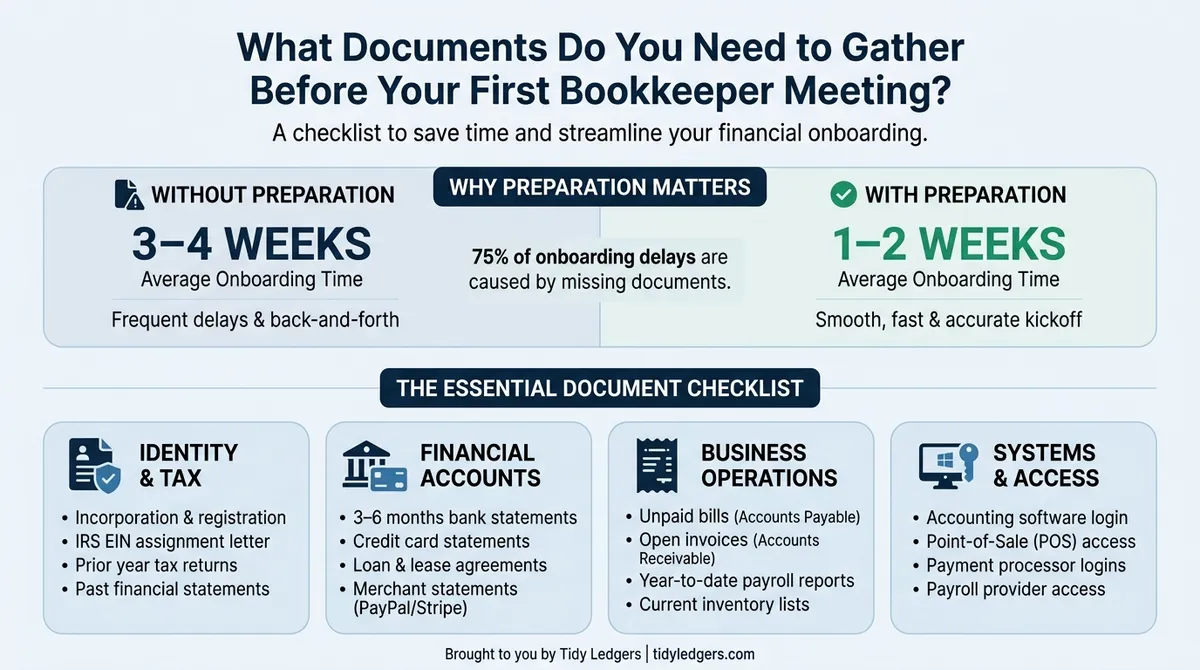
Key data and insights: What Documents Do You Need to Gather Before Your First Bookkeeper Meeting?
Gather the Core Financial Documents First
Start with the records that show where your money moved. Your bookkeeper's scope sets the period, so confirm it before you pull anything. Many first meetings cover a set number of months or a full tax year, but there's no universal rule.

| Document | Period to Confirm | What It Helps Verify | Preferred Format |
|---|---|---|---|
| Bank statements | Scope-dependent; ask your bookkeeper | Opening and closing balances, every deposit and withdrawal | PDF, plus CSV export if available |
| Credit card statements | Same period as bank statements | Statement balances, charges, payments, interest | PDF, plus CSV export |
| Processor reports | Scope-dependent | Gross sales, refunds, fees, sales tax, net payouts | CSV or PDF summary |
| Cash logs | Scope-dependent, if you take cash | Cash sales, deposits, petty-cash spending | Spreadsheet or clear scans |
| Last filed business return | Most recent filing year | Prior-year income, deductions, and filing year | |
| Existing financial reports | Latest reconciled month, if any | Prior balances and the last reconciled month | PDF or Excel export |
Bank and Credit Card Statements for Every Business Account
Collect full monthly statements for business checking, savings, and credit cards. Add any other account you used for business transactions. Include accounts you closed during the period.
If a personal account holds business transactions, flag it. Don't upload unrelated personal records on your own. Let your bookkeeper decide what's needed.
Statements show opening and closing balances for their own period. Transaction exports show the detail. One doesn't always replace the other, so bring both when you can. Check that every page is there and note any missing months.
Payment Processor Reports and Cash Records
Pull reports from every processor, point-of-sale system, and online marketplace you used. Look for gross sales, refunds, processing fees, sales tax collected, and net payouts. A bank deposit usually shows only the net amount, so it hides the real revenue and fees.
- Processor or marketplace payout reports
- Cash sales logs and deposit slips
- Petty-cash records, if you keep them
The Last Filed Business Return and Current Financial Reports
Find your most recent filed business return. Sole proprietors can bring the relevant business schedules instead. Returns give history, but they don't replace current books.
If you already have a profit and loss statement, balance sheet, general ledger, trial balance, or reconciliation reports, export them. Label the report dates and the accounting basis if you know it. Don't build new reports just for this meeting. For a full walkthrough, see our bookkeeper handoff checklist.
Add Sales, Expense, Payroll, and Contractor Records
Your bank statements show money moving. They don't show why. Invoices, bills, and payroll records fill in the story, so pull them together before the meeting.
- Sales: customer invoices, credits, refunds, and an open customer balance list.
- Expenses: receipts, vendor bills, unpaid bills, reimbursement requests, and recurring service agreements.
- Only if applicable: payroll reports, contractor payment summaries, and existing Forms W-9.
Customer Invoices and Unpaid Balances
Gather every sales invoice, customer credit, and refund. If you have an accounts receivable aging report, bring it. If not, a simple list of who owes you and how much works fine.
Watch for deposits and prepayments. They often don't match a bank deposit in an obvious way. Also ask your bookkeeper how your accounting method, cash or accrual, changes which records matter most. For older gaps, our catch-up bookkeeping checklist can help you sort what's missing.
Receipts, Vendor Bills, and Owner-Paid Expenses
Collect receipts, supplier invoices, and bills you haven't paid yet. Each record should show the vendor, date, amount, and what you bought. Add the business purpose when it isn't obvious.
Proof of payment and proof of purchase are different things. A bank line shows you paid. A receipt shows what you got, as IRS Publication 583 notes in its discussion of supporting documents. You may need both.
Flag three trouble spots:
- Business expenses you paid personally.
- Personal purchases on business accounts.
- Expenses with no supporting document.
Payroll Reports and Contractor Information, If Applicable
Not every business has payroll or contractors. Skip this part if you don't. If you do, bring payroll registers, year-to-date summaries, and any filed Forms 941 and 940. Add Forms W-2 and W-3 and relevant state filings if you have them. The IRS explains these obligations on its employment taxes page.
Include payroll liability balances and benefit deduction summaries too. They affect your books even when they don't feel like expenses.
For contractors, prepare a payment-by-payee report and any Forms W-9 on file. Add prior information returns (such as Forms 1099) if they apply. Tax treatment varies by situation, so let your bookkeeper sort that out. Don't email full taxpayer ID numbers. For tips on collecting W-9 forms from contractors, we've got a guide.
Identify Loans, Assets, Inventory, and Missing Records
Some records only matter if they fit your business. A loan, a new truck, or a stockroom each needs its own paperwork. Use the table below to see what to pull together.

| Business Situation | Records to Gather | Details to Flag |
|---|---|---|
| Business loan | Loan statement or agreement | Principal, interest, fees |
| Equipment purchase | Invoice or financing record | Purchase date and cost |
| Product inventory | Count or valuation report | Count date and quantities |
| Owner-funded expense | Receipt or payment evidence | Amount and reimbursement status |
Loan Statements and Owner Contributions or Draws
Gather your loan agreements, lender statements, and any amortization schedules. Bring records of financed purchases too. Each loan payment usually has parts: principal, interest, and fees.
Don't treat the whole payment as an expense. Your bookkeeper needs the breakdown and the payment dates.
Owner money needs a paper trail as well. Note any contributions, draws, reimbursements, and transfers between accounts. If a transaction looks unclear, flag it. Guessing at the treatment can create bigger problems later.
Equipment Purchases, Inventory Counts, and Other Assets
Look for invoices and financing papers for equipment, vehicles, and other business assets. Add sale or disposal records if you've let anything go. Bring any depreciation schedule you already have.
If you sell products, collect your latest inventory counts. Bring purchase costs and any valuation reports. Lease or financing agreements help too, since they explain recurring payments.
Don't worry about how to treat these items for tax. Your bookkeeper may coordinate with your tax preparer on depreciation and capitalization. Your job is to hand over the documents.
Make a Gap List Instead of Delaying the Meeting
You won't have everything. That's normal. Don't cancel the meeting to hunt for perfect records.
Write a short gap list instead. Include these items:
- Missing bank or card statements
- Uncategorized transactions
- Unreconciled months
- Known discrepancies
Next to each gap, note where a replacement might come from. That could be your bank portal, payroll provider, or a prior accountant. Gaps can change the scope, timing, or cost of the work, so raise them early. Our catch-up bookkeeping checklist can help you spot what's missing.
Sharing statements and logins is a real concern. Ask how your bookkeeper handles financial data security before you send anything.
Know Which Records to Keep and Whether Copies Work
Your bookkeeper will ask what you can toss and what you must save. The answer depends on the record, the year, and your situation. Treat the federal rules below as general guidance, not a countdown to shred everything.

Understand the Main IRS Record Retention Rules
For federal income tax, the IRS generally says to keep supporting records for three years from the date you file, as explained on the IRS page How long should I keep records? A separate, later-of clock (three years after filing or two years after you pay the tax) applies only to claims for credit or refund filed after your return. Several exceptions change the general clock. Here's the short version:
- Three-year baseline: the usual period for most income tax records.
- Six years: applies if you leave out more than 25% of the gross income shown on your return.
- Seven years: applies if you file a claim for a loss from worthless securities or a bad debt deduction.
- No time limit: applies if you never file a return or you file a fraudulent one.
- Employment tax: keep records at least four years after the tax is due or paid, whichever is later.
- Property records: keep them until the limitations period ends for the year you dispose of the property in a taxable disposition.
One more wrinkle: the IRS treats a return filed before the due date as filed on the due date, which affects when your retention period starts. Confirm the current rule on its site before you set a destruction date. If you're in Idaho, these business record retention guidelines cover the Idaho-specific context. Your bookkeeper can tell you which rules fit your business.
Check Digital Copies for Completeness and Readability
Paper isn't the only option. The IRS generally accepts electronic records that accurately reproduce the original information and stay accessible and reproducible, as outlined in IRS Publication 583. The IRS does allow you to destroy originals once your electronic storage system has been tested and reproduces them in compliance with its requirements. Until you've confirmed that, don't toss originals automatically just because you scanned them.
Before you hand over scans, give each file a quick check. Look for cut-off totals, missing pages, and unreadable dates. Make sure attachments came along with their supporting detail, such as an itemized list behind a summary invoice.
Keep original exports from your bank or software exactly as downloaded. Don't edit source files while you organize them. Make a working copy instead.
Also separate onboarding from retention. Getting organized for your first meeting is a short task. Keeping records is a long one, and state rules, contracts, lenders, or other legal needs may require more time than the IRS does.
Organize Files, Share Them Securely, and Prepare Questions
You've gathered the paperwork. Now make it easy to hand over and easy to use. A little structure before the meeting saves your bookkeeper hours later.
Use Clear Folders and the Agreed Secure Upload Method
Create one folder per category, but only for what applies to your business. Common choices are bank statements, credit cards, sales, expenses, payroll, taxes, loans, and assets. Skip any folder you don't need.
Name files so anyone can sort them at a glance. A good pattern is 2026-09_BusinessChecking_Last4-1234.pdf. Use the last four digits only. Never put full account numbers or taxpayer IDs in a filename. The same goes for collecting W-9 forms from contractors, since those forms hold sensitive identifiers.
Ask how your bookkeeper wants to receive files before you upload anything. Skip ordinary email attachments for confidential records. Our page on financial data security is a good place to start.
Provide Authorized Access Without Sharing Passwords
Many banks and accounting platforms let you invite an accountant or bookkeeper directly. That gives them their own login, so you never hand over yours. Where the platform supports it, choose read-only or limited permissions.
Government guidance on cybersecurity points the same way. CISA's guidance on strong passwords stresses unique credentials and multifactor authentication. Passing around your own login undercuts both.
- Use invitations or delegated access instead of shared logins.
- Give the least access needed for the job.
- Turn on multifactor authentication for every account.
- Confirm who owns the accounting software subscription.
- Never send banking passwords, one-time codes, or recovery codes.
One more point. A bank feed doesn't replace every record. Ask which supporting files your bookkeeper still wants, even with software access in place.
Bring a Short Agenda and Leave With Clear Next Steps
Think of this meeting as a practical review. It isn't an audit, and it isn't a test of how organized you are. Your bookkeeper has seen messy records before.
- Ask what the service covers and what it doesn't.
- Decide which cleanup work comes first.
- Clarify monthly tasks, report timing, and how you'll communicate.
- Review payroll, sales tax, and reporting deadlines that apply to you. Don't assume bookkeeping includes tax preparation or filing.
- Before you leave, agree on the remaining documents, who sends them, how, and when you'll check in next.
The IRS recordkeeping guidance for small businesses is a handy reference for how long to keep what you hand over.
Frequently Asked Questions
How many months of bank statements should I bring to my first bookkeeper meeting?
It depends on the work. New ongoing bookkeeping may need only the last few months, a current-year review often needs statements from January to today, and a cleanup of past years needs every month in the period. Ask your bookkeeper which period they want before you collect files.
One recent statement is fine for an intro chat. It shows opening and closing balances for its own month, but it doesn't give the prior history or month-to-month continuity needed to complete multi-month reconciliations.
Can I meet with a bookkeeper if my receipts or records are incomplete?
Yes. Many bookkeepers expect some gaps and can start with what you have. Bring a short list of what's missing, download any reports you can from your bank, card, or payment apps, and request missing statements from your bank.
Your bookkeeper will figure out what can be rebuilt from other records, what support you still need, and how the gaps affect the scope and cost. Never fabricate receipts after the fact. If a receipt is lost, tell your bookkeeper. They can help you document the expense using bank or card statements and a written explanation.
Do I need original paper receipts, or are digital copies acceptable?
For federal tax recordkeeping, digital copies are generally fine if they're accurate, complete, easy to retrieve, and can be reproduced when needed. A clear scan that shows the vendor, date, amount, and items is good. A blurry or cropped photo that cuts off details is not.
Ask your bookkeeper what format they prefer, and keep the originals if a contract, lender, or other rule requires them. The IRS generally advises keeping tax support records for at least 3 years from filing, and longer in some cases.
Conclusion
Start by confirming the scope of work and the period your bookkeeper will cover. Then gather your bank statements, credit card statements, and any existing financial reports. Add payroll, contractor, inventory, or loan records only if they apply to your business. If something is missing, write it down so you can talk about it openly.
You don't need perfect books to show up. Secure sharing and clear questions matter more. Contact Tidy Ledgers Bookkeeping to discuss your business, confirm which records you need for your first meeting, and set up the right way to share them.
Sources
- IRS: Recordkeeping for small businesses
- IRS: How long should I keep records?
- IRS Publication 583: Starting a Business and Keeping Records
- SBA: Manage your finances
- IRS: Employment taxes
- CISA: Require strong passwords
Related Articles
From a free books health check to clean monthly books closed by the 10th, here is exactly what working with Tidy Ledgers nationwide looks like.
Use this 30-day checklist to switch bookkeepers safely, transfer records and access, set a clean cutoff, and verify the first monthly close.
Behind on your bookkeeping? Use this step-by-step catch-up checklist to gather statements, reconcile accounts, fix categories, and get tax-ready.
Plain-English bookkeeping guides for business owners: sales tax, catch-up checklists, choosing a bookkeeper, starting a business, and more.
Common questions
How many months of bank statements should I bring to my first bookkeeper meeting?
It depends on the work. New ongoing bookkeeping may need only the last few months, a current-year review usually needs statements from January to today, and a cleanup of past years needs every month in the period. Ask your bookkeeper which period they want before you collect files. One recent statement is fine for an intro chat, but it won't give them opening balances or let them complete reconciliations.
Can I meet with a bookkeeper if my receipts or records are incomplete?
Yes. Most bookkeepers expect some gaps and can start with what you have. Bring a short list of what's missing, download any reports you can from your bank, card, or payment apps, and request missing statements from your bank. Your bookkeeper will figure out what can be rebuilt from other records, what support you still need, and how the gaps affect the scope and cost. Never create receipts after the fact. Tell them what's missing and let them guide you.
Do I need original paper receipts, or are digital copies acceptable?
For federal tax recordkeeping, digital copies are generally fine if they're accurate, complete, easy to retrieve, and can be reproduced when needed. A clear scan that shows the vendor, date, amount, and items is good. A blurry or cropped photo that cuts off details is not. Ask your bookkeeper what format they prefer, and keep the originals if a contract, lender, or other rule requires them. The IRS generally advises keeping tax support records for at least 3 years from filing, and longer in some cases.

Want this handled for you?
Get a free, no-obligation quote and a quick health check of where your books stand. We reply within one business day. No pitch, no pressure.